QUESTION 60
Note: This question is part of a series of questions that present the same scenario. Each question in the series contains a unique solution that might meet the stated goals. Some question sets might have more than one correct solution, while others might not have a correct solution.
After you answer a question in this question, you will NOT be able to return to it. As a result, these questions will not appear in the review screen.
You have an Azure IoT solution that includes an Azure IoT hub, a Device Provisioning Service instance, and
1,000 connected IoT devices.
All the IoT devices are provisioned automatically by using one enrollment group.
You need to temporarily disable the IoT devices from the connecting to the IoT hub.
Solution: From the Device Provisioning Service, you disable the enrollment group, and you disable device entries in the identity registry of the IoT hub to which the IoT devices are provisioned.
Does the solution meet the goal?
You may find it necessary to deprovision devices that were previously auto-provisioned through the Device Provisioning Service.
In general, deprovisioning a device involves two steps:
1. Disenroll the device from your provisioning service, to prevent future auto-provisioning. Depending on whether you want to revoke access temporarily or permanently, you may want to either disable or delete an enrollment entry.
2. Deregister the device from your IoT Hub, to prevent future communications and data transfer. Again, you can temporarily disable or permanently delete the device’s entry in the identity registry for the IoT Hub where it was provisioned.
Reference:
https://docs.microsoft.com/bs-latn-ba/azure/iot-dps/how-to-unprovision-devices
AZ-220
Number: AZ-220
Passing Score: 800
Time Limit: 120 min
File Version: 1
AZ-220
Implement the IoT solution infrastructure
Testlet 1
Case Study
This is a case study. Case studies are not timed separately. You can use as much exam time as you
would like to complete each case. However, there may be additional case studies and sections on this
exam. You must manage your time to ensure that you are able to complete all questions included on this exam
in the time provided.
To answer the questions included in a case study, you will need to reference information that is provided in the
case study. Case studies might contain exhibits and other resources that provide more information about the
scenario that is described in the case study. Each question is independent of the other question on this case
study.
At the end of this case study, a review screen will appear. This screen allows you to review your answers and
to make changes before you move to the next sections of the exam. After you begin a new section, you cannot
return to this section.
To start the case study
To display the first question on this case study, click the Next button. Use the buttons in the left pane to explore
the content of the case study before you answer the questions. Clicking these buttons displays information
such as business requirements, existing environment, and problem statements. If the case study has an All
Information tab, note that the information displayed is identical to the information displayed on the subsequent
tabs. When you are ready to answer a question, click the Question button to return to the question.
Existing Environment. Current State of Development
Contoso produces a set of Bluetooth sensors that read the temperature and humidity. The sensors connect to
IoT gateway devices that relay the data.
All the IoT gateway devices connect to an Azure IoT hub named iothub1.
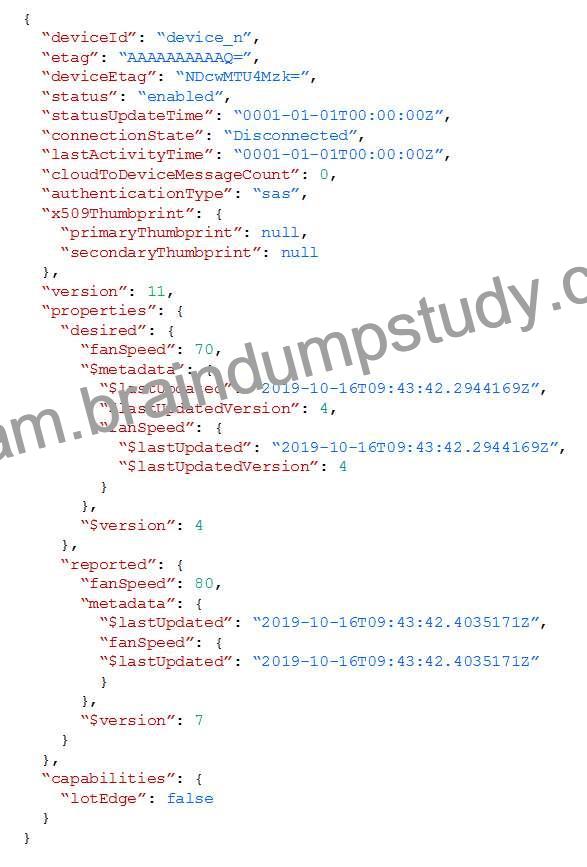
Existing Environment. Device Twin
You plan to implement device twins by using the following JSON sample.
Existing Environment. Azure Stream Analytics
Each room will have between three to five sensors that will generate readings that are sent to a single IoT
gateway device. The IoT gateway device will forward all the readings to iothub1 at intervals of between 10 and
60 seconds.
You plan to use a gateway pattern so that each IoT gateway device will have its own IoT Hub device identity.
You draft the following query, which is missing the GROUP BYclause.
SELECT
AVG(temperature),
System.TimeStamp() AS AsaTime
FROM
Iothub
You plan to use a 30-second period to calculate the average temperature reading of the sensors.
You plan to minimize latency between the condition reported by the sensors and the corresponding alert issued
by the Stream Analytics job.
Existing Environment. Device Messages
The IoT gateway devices will send messages that contain the following JSON data whenever the temperature
exceeds a specified threshold.
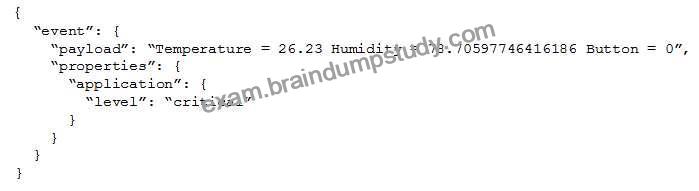
The levelproperty will be used to route the messages to an Azure Service Bus queue endpoint named
criticalep.
Existing Environment. Issues
You discover connectivity issues between the IoT gateway devices and iothub1, which cause IoT devices to
lose connectivity and messages.
Requirements. Planning Changes
Contoso plans to make the following changes:
* Use Stream Analytics to process and view data.
* Use Azure Time Series Insights to visualize data.
* Implement a system to sync device statuses and required settings.
* Add extra information to messages by using message enrichment.
* Create a notification system to send an alert if a condition exceeds a specified threshold.
* Implement a system to identify what causes the intermittent connection issues and lost messages.
Requirements. Technical Requirements
Contoso must meet the following requirements:
* Use the built-in functions of IoT Hub whenever possible.
* Minimize hardware and software costs whenever possible.
* Minimize administrative effort to provision devices at scale.
* Implement a system to trace message flow to and from iothub1.
* Minimize the amount of custom coding required to implement the planned changes.
* Prevent read operations from being negatively affected when you implement additional services.
Implement the IoT solution infrastructure
Question Set 2


